
Image formats are not about good and bad. Instead, it’s about using the correct image format at the correct time and at the correct place. All the image formats that exist are good, but for their own purposes!
WebP is better for web use like blogging, digital marketing and for e-commerce etc. On other hand, JPG is best for photography and printing. And about PNG, it’s best for logos. Did you observe, there is a major difference among each other.
So today, we are gonna discuss why WebP is one and only the best option for web use with the 7 strong reasons.
By the way, You can safely use our JPG to WebP Converter for maximum safety while converting to WebP.
Table of Contents
What is WebP?
WebP is a modern image format that was developed and introduced by Google in 2010, especially for web use. The main intention behind WebP is to serve high quality images with lower possible size to reduce server load for websites, and make images load faster for better SEO.
Want to know more about WebP? Check out our article What is WebP and How it Improves SEO.
1. WebP is Lighter but Contains an High Image Quality
WebPs are lighter and faster than JPG. Yes! It’s a beauty of WebP images that it holds a high quality image like JPG, but in very lower size compared to JPG. This is what Google expects from a good website. Because image size matters in SEO! If you use higher size images like JPG in your website, it can lead to negative effects on site SEO and rankings.
Why does small image size matters in SEO?
The direct reason, it boosts the page loading speed on our website. And the fast loading pages are what the main ranking factors that matters in famous search engines like Google.
For example, let’s imagine you visited a random website while researching and it loads quickly, don’t you get a positive vibe on that website? Yes, time is money in this world. If users feels that our website is saving their time with fast loading pages, they’ll love our website and like to spend more time on our site and boom, this is what Google wants! Believe me it’s a basic human psychology.
Example: JPG vs WebP size difference
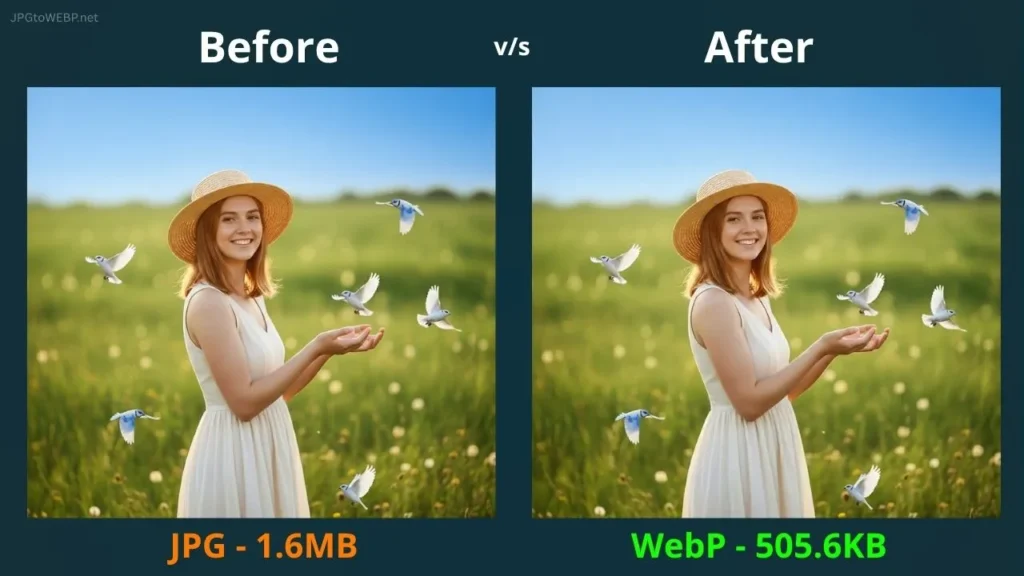
Size saved by 68.4% which means we saved 1.09 MB!
2. WebP images Has a Loading Fast Capability Compared to Others
People love fast things! Even if they save 1 second with faster loading images and faster pages, they feel like they saved a lot of time and get a positive vibe. And a positive user experience is what Google needs!
Also faster loading is a very essential thing in SEO. In simple words, both users and Google like those websites which loads faster and smoother, (which can be possible through WebP) and improve your rankings in search results because users are liking your website.
3. WebP Effectively Improves Core Web Vitals and SEO
Yes, WebP is specially designed to improve site SEO and core web vitals, that’s why Google suggests it to use for web uses.
WebP improves Largest Contentful Paint (LCP)
LCP is one of the most important metric which measures a website’s performance and time taken by the largest element in our website to load. In simple words, LCP measures how many seconds it takes to load the large elements like images on our site. WebP images effectively improve LCP in our website which is an advantage to rank high.
INP (Interaction to Next Paint)
INP is the second most important metric which can also be improved by using WebP images on our website.
Also improves CLS (Cumulative Layout Shift)
The third main metric CLS which is used to measure visual stability of our web pages, can also be boosted with WebP image usage. Honestly, WebP helps us with a lot of technical things!
4. A Format That Supports Both Lossless & Lossy Compression
WebP provides 2 in 1 advantage. A lossless compression which is highly important for people like us who are using images for websites. A lossless compression is a process of compressing an image without losing its visual quality but only reducing its size. It’s very important for bloggers, e-commerce websites and also for digital marketers.
On the other hand, WebP also supports lossy compression. In simple words, lossy compression means, a process where image quality can also be affected or reduced while compressing the image file size. Lossy compression is best for those people who don’t care if the image quality reduced slightly, but want higher file size compression.
While JPG and PNG can’t do this at a time, WebP can support both lossless and lossy compression at once. The advantages of WebP for web performance are clear!
Our Recommendation is Always start with lossless compression. If your image size is still heavy, you can try a lossy compression at 90% quality. For 99% of web uses, this is the perfect balance.
5. WebP Format Supports Animation Similar to GIF
GIF is a digital file format which is mostly used to display a looping, short animated clip, or an illusion of movement. Surprisingly, WebP can also have a capability to achieve this while JPG or PNG can’t.
WebP can also support animated images or short looping clips, same as GIF. GIF has been a universal format for decades to create simple, loop animations. While on the other hand, WebP is a modern format which can achieve a better and quality compression, making it an excellent choice for web use.
6. WebP Saves Hosting Resources
WebP images primarily saves hosting resources by reducing its file size. Because of its smaller file size, WebP acquires a small amount of storage space inside hosting compared to other formats.
Small file size means lower server load, which reduces overall bandwidth consumption for websites. In simple words, WebP will reduce your hosting server load, optimize server performance and provide a better experience for users on every type of device.
WebP can also help us with maintaining a budget friendly hosting for long time without upgrading to higher one.
7. WebP, A Format Officially Recommended by Google
To improve website performance and speed by using lighter images, Google officially announced WebP image format in September 2010. And Google always recommends WebP especially for web use like blogging and e-commerce, because these are the things where images are mostly used.
Other image formats are better, but for their own purposes. JPG and PNG are good but they are not made for websites. WebP is officially made for web use for digital marketers, bloggers, e-commerce stores and other web uses.
So, this is the 7th strong reason for why WebP is better than JPG and PNG, because it’s a format highly recommended by Google itself. So, JPG and PNG can’t ever beat WebP especially in web uses. Now, let’s talk about some pros and cons of WebP images.
Pros and Cons of WebP and JPG
| Feature | WebP | JPG |
|---|---|---|
| File Size | Smaller | Larger |
| Quality | High | High |
| Compression | Lossy + Lossless | Mostly Lossy |
| Speed | Faster Loading | Slower Loading |
| Transparency | Yes | No |
| Animation | Yes | No |
| Hosting Usage | Low | High |
| Best For | Websites/SEO | Photography/Printing |
In What Situation JPG and PNG Formats Still Useful?
While WebP is great for web use, JPG and PNGs can also be useful for different use cases, like JPG is best for photography and PNG is best for logos, icons, because it supports transparent backgrounds.
JPG has been a default image format for photography for decades. Yes, it’s really great for photography, sharing and printing purposes. But as always said, no image format can beat WebP especially for web use! So, I hope you guys aren’t confused.
How to Safely Convert JPGs to WebP Format?
Safety matters guys! WebP conversion is a normal thing but no one talks about how to convert JPG to WebP in a safe way!
I am not sure that most people know about it that, most of the converters online use server conversion method. Which means, all of your images are uploaded on their server, then convert it to WebP. So, there is a high chance that your uploaded images are stored somewhere in their server, which is not a safe way!
For this exact reason, I created a tool that converts your JPGs to WebP online inside your web browser (not inside any server).
All of your images are safely converted to WebP using client-side conversion technology. Because all of your images are converted in your web browser, it’s all erased once you refreshed the page so, make sure to download all converted images before refreshing.
You can safely use our JPG to WebP Converter for maximum safety.
Conclusion
In conclusion, never make a mistake of using JPG images directly in your website. It can negatively affect your website SEO and rankings. For this exact reason Google brought us a light weight image format called WebP, which is perfect for web use.
WebP can silently improve a lot of technical things that we don’t even know about. So, using WebP images improves our site speed, performance, SEO, and reduces hosting storage cost. According to my experience, WebP is a pot filled with benefits!
Have a Great Day!