
Hello everyone, Welcome! The short answer is, Yes. WebP can significantly boost your website speed because it’s usually smaller in size compared to JPG or PNG. Smaller image size becomes the reason for lower server loads and high website speed, which is a main factor in SEO.
WebP – a modern image format recommended by Google can boost site performance, provide better user experience with faster loading images, improve core web vitals and many other improvements in Technical SEO.
These improvements in our site through WebP are the turning points for good rankings in search results.
If you’re new to WebP, you can easily understand it by reading our guide on What is WebP and How it Improves SEO.
Table of Contents
What Makes a Website Fast in 2025?
Several things can suddenly boost our website speed like
- Optimizing images to modern WebP format
- Minimising and combining codes like HTML, CSS and JavaScript
- Using a CDN (content delivery network)
- And using a good caching plugin will also increase our website speed.
But, image size plays a very important role in website speed. If you are using higher file size images like JPG or PNG directly in your website, no doubt it will slow down your site immediately. For this exact reason, Google introduced WebP format 15 years ago but only a certain amount of people know about it!
Images usually take the largest weight on a webpage (40–60%) and images like JPG and PNG can acquire more storage space inside our hosting. So using WebP helps us here! WebP images hold the best image quality with up to 50% smaller in size compared to JPG.
So always remember, wrong image format can directly affect website speed.
Why WebP Loads Faster Than JPG or PNG?
Reason 1: WebP Has Smaller File Size
WebP contains high quality images in a very compact file size. For example, if you have a JPG image with file size of 2MB, converting it to WebP can save its size by 40-50% (1 MB Saved). Smaller file size is the first main reason why WebP images load faster.
Reason 2: WebP Is Optimized for Browsers
While JPG and PNG are made for other use cases, WebP is exactly made for websites. WebP is launched by Google and specifically designed to improve website speed and performance. So, converting to WebP format saves your website health.
You can use our safe converter for converting to WebP with maximum safety. It works on client-side conversion technology (converting inside your browser) while others use servers and store your images.
How WebP Improves Core Web Vitals?
Core web vitals – a set of metrics developed by Google which is used to measure the user experience of websites. In simple words, core web vitals measures site loading performance, visual stability and interactivity. It’s very important because it can improve site SEO, better rankings and directly enhance user satisfaction.
Improves LCP
Largest Contentful Paint (LCP) is a key metric of core web vitals and it measures the loading performance of websites, by tracking how much time does the largest element (Hero section image or a text block) has taken to load when a user visited our site. If the image loads faster while user visits our site, LCP score will be automatically improved which helps in better ranking.
Improves INP & CLS Indirectly
Interaction to Next Paint (INP) and Cumulative Layout Shift (CLS) can also be improved while using WebP images. CLS measures the layout shifts in our sites.
For example, imagine you visited a random website while researching and decided to tap or click any button there, the layout suddenly moves upward because an ad or something loaded too late. This is what CLS means. Remember, High CLS = Bad User Experience.
If you use larger size images like JPG, it won’t load faster and CLS will be increased on your site which will cause negative impacts on site SEO. WebP is a proper solution to maintain a good CLS.
Does WebP Really Help Website Rankings?
Google won’t say “Use WebP or no rank.” But using WebP images dramatically improves website speed (because it’s lighter), provides a better user experience and higher ranking potential.
Faster loading websites positively attract people and if they feel your website is faster compared to others (which is possible through WebP), they love to spend more time on your website and this is what Google wants! If users are deciding to spend more time on your site, Google automatically makes your site visible to more people as possible.
So yes, WebP indirectly helps rankings by improving performance.
Real Example: WebP vs JPG Size Difference
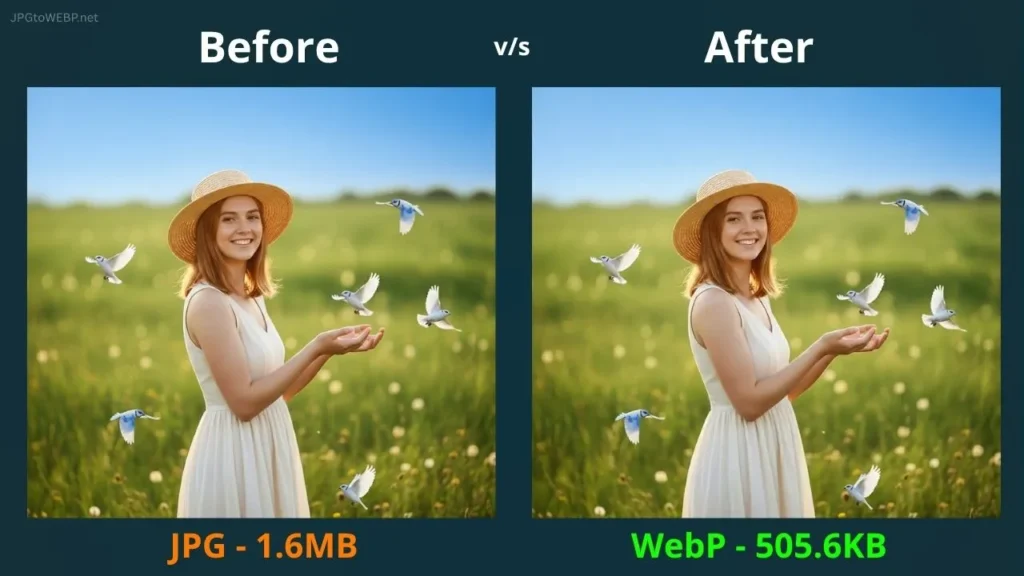
This is the kind of size reduction that massively improves website speed. You may not see major size savings in a single image but, think how much it improves your site when it comes to tens or hundreds of images! There is a big difference between JPG and WebP especially in performance!
Want a full comparison? Check out our guide JPG vs WebP to understand which format is better and why.
In my personal opinion, WebP is a pot filled with SEO benefits.
How to Convert JPG to WebP Safely?
Safety matters, especially while converting an image! Yes, I am serious about it because I found several online converters that use a server-based conversion method and by using that, there is a high chance that your images are stored somewhere in their server without even knowing. No safety. That’s true!
What’s the safest method to convert to WebP?
A method like browser-based or client-side conversions, where all the images are converted safely inside your browser is considered as a safe WebP conversion! It’s the safest way that exists currently.
So, I contacted some web developers and built this Safe WebP Converter which uses client-side conversion technology and converts all of your JPGs to WebP inside your browser. Remember to keep your distance from those tools that use server-based conversions!
I created this tool just because I was a blogger (a few years ago) and I know that privacy frustrations while converting an image! So, I just made a tool that maintains user privacy and remove those frustrations. Nothing more than that.
FAQs
Does WebP support transparent backgrounds?
Yes, WebP images will clearly support transparent backgrounds like PNG and also maintains a good quality like JPG. Both in one.
Does WebP reduce image quality?
No, WebP is specifically designed to compress image file size without sacrificing even 1% of original quality. Maximum quality with lower file size!
Does WebP work on all browsers?
Yes. WebP supports almost 98% of web browsers like chrome, firefox, edge, safari etc. It’s made for web use so it supports maximum browsers.
Is WebP better than JPEG and PNG?
Definitely, but for web uses (blogging, e-commerce, etc). JPEG and PNG are good for their separate use cases (photography, icons etc), but they’re not made for websites! Using JPEG and PNG for websites can cause negative impacts on SEO. So WebP is always a better option for websites.
Do WebP images improve speed?
Yes! WebP images can significantly boost your website speed because it’s lighter and faster than other formats. So yes, by using WebP images you will notice a major improvements in website speed.
Do WebP images load faster?
Yes! WebP images load faster just because it’s smaller in size compared to other formats. Smaller images = fast loading websites = better rankings.
Conclusion
In conclusion, WebP images are always beneficial especially for websites. It provides quality, improves performance & speed that other formats can’t. So if you are serious about your blog or website career, using WebP is compulsory to maintain your website health and performance.
Remember not to use those converters which use server-based conversions, because privacy matters for everyone! You can safely convert to WebP inside your browser using our Safe WebP Converter tool. All the data will be erased after refreshing the page, so make sure to download converted images before refreshing.
Confused about how to convert without mistakes? Learn how to convert JPG to WebP safely in our full guide (It’s very simple).
Have a Great Day!