
WebP – a modern image format that Google loves! Yes, it’s highly recommended by Google to improve website speed and performance by smaller image size.
Google just noticed JPGs and PNGs are heavier in size and realised it’s not suitable for websites in long run! So, Google decided to launch an image format that should be lighter and faster as it need for websites, and announced WebP on 2010.
- WebP images improves website speed by reducing file size up to 50%.
- Improves website performance & SEO.
- Boost core web vitals which helps for better rankings.
You heard right, WebP images are so lighter than other formats while holding the same quality. Today, In this article, we’ll deeply learn about what is WebP and how it maintains a high role in SEO. So, let’s start!
You can safely convert your JPGs to WebP in our JPG to WEBP Converter.
Table of Contents
What is WebP and When is it Launched?
On 30th September 2010, Google officially announced WebP image format for the first time to everyone. According to Google, WebP image format is an open and straightforward way for compressing graphics on the web browser. The main intention and goal behind WebP format is mainly to make images smaller in size. JPG and PNG image formats contain large size images which are not suitable for web use like digital marketing or blogging.
WebP stands out mainly here, to reduce only the image size while maintaining the maximum original quality. Because of the lower file size, WebP reduces server load and do not acquire a huge space inside your hosting. This is the main reason why your website becomes faster by using WebP images, and it’s a huge step in improving SEO (Search Engine Optimization).
Why Google Recommend WebP Images?
Simple! Google recommends it because it improves site performance and core web vitals. Yes. According to Google documentation, WebP images are nearly 35% smaller compared to JPG and 26% smaller compared to PNG. WebP is a direct way to make images smaller without quality loss and it’s highly recommended for web use. You can read an official document by Google about WebP here.
Practical Comparison of WebP vs JPG
Let’s compare both WebP and JPG together to see a massive change that can’t be explained in just words!
JPG Image (Size – 1.6 MB)

Converted WebP Image (Size – 426 KB with same quality)

Final Result – file size reduced by 74% while maintaining the same original quality! Guys, understand why Google loves WebP and recommend it to us? Because it’s smaller, faster and perfect for websites!
For more detailed comparison, check out JPG vs PNG vs WebP Comparison.
How WebP Improves SEO?
WebP is nothing but Google’s recommended format! WebP images SEO improves a lot of technical things that you don’t even know about. It improves largest contentful paint (LCP) and provide better user experience.
Your website SEO is automatically boosted when you use WebP images, because Google loves it! Technical SEO, On page SEO and Off page SEO is required for high rankings, you can’t ignore them! But using WebP images is the part of a Website Performance Optimization, which is highly necessary to rank. In my opinion, just use WebP images and maintain basic on page, off page, & technical SEO and you’ll see a major change in your website rankings. It’s not a magic but definitely a Fact!
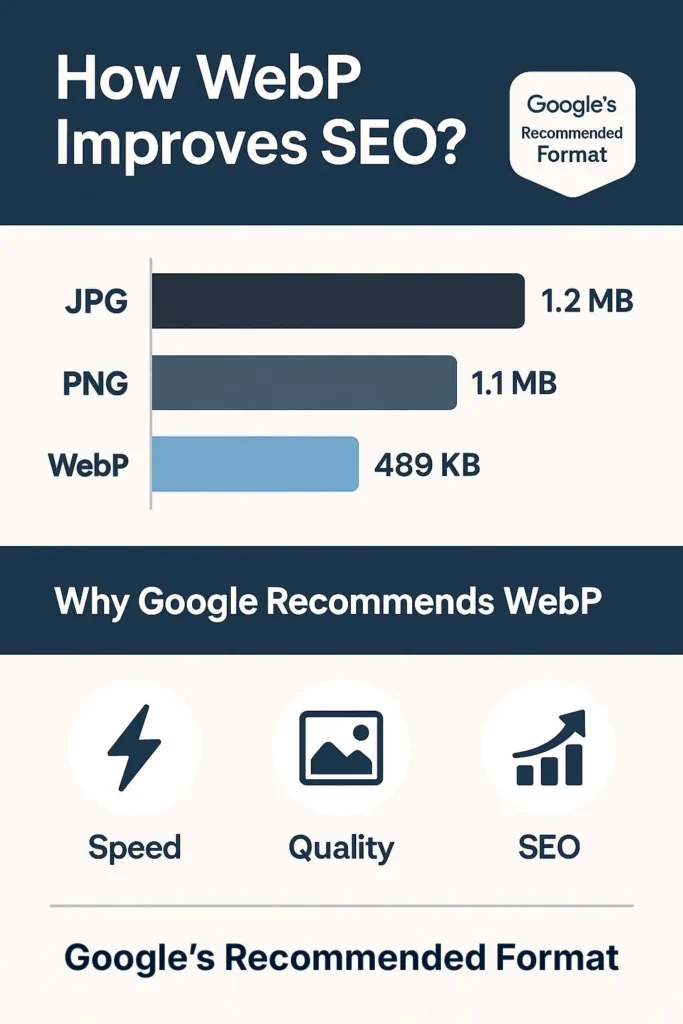
Your rankings will definitely improve by WebP images because not a lot of people are using it! So, it’s an early advantage for those who take action!
Why Using WebP is Highly Beneficial?
If you are using WebP images in your website, you are far ahead of those people who still don’t know about WebP. That’s 100% true guys! A majority of people use JPG inside their website which causes a lower website speed. The majority of people don’t even have an idea about WebP!
Google is literally screaming to use WebP images, which are very smaller in size compared to JPG. There is not such a perfect example except this.
How to Convert JPG to WebP in the Safest Way?
Safe JPG to WebP Conversion is the main factor that the majority of people don’t know. You rarely find a tool online that converts your JPG images to WebP without any risk or privacy! Yes, guys! The famous JPG to WebP Converter you see is likely to upload your images to their server, then convert it to WebP, and provide it to you. When this process happens, all of your uploaded images are stored somewhere in their servers, which is not a good thing!
I personally struggled with this same problem for years and finally built something genuine solution for this conversion process! Yes guys, I personally reached out to some developers, researched and finally found a way to convert JPG images to WebP without uploading to any servers, which is 100% safe! Yes, our JPG to WebP Converter makes this 100% possible. Our tool works on a browser conversation technology, which converts your every JPG to WebP in seconds on your browser itself!
You heard right! We do not store your images anywhere, we do not use any servers to convert, and all your uploaded images are 100% converted inside your browser and you can download it safely. Guys, I was not convincing you to use our tool. Just explaining the reality!
How Our JPG to WebP Converter Actually Works?
Our JPG to WebP Converter – founded in September 2025, works on a basic principle of browser conversion technology. Simple – upload your JPG image > choose conversion settings > then easily download the converted images. All it happens in under 5 seconds.
As said, I am an guy who actually struggled without this type of safe conversion method in the past few years. So, I have analysed all my mistakes, struggles and needs and developed 3 pre-built presets that covers maximum category people.
Convert images safely in our to WebP Converter tool instantly.
Web Optimized Preset
Web optimized preset is mainly for those people who mostly work on web based works like digital marketing, blogging, e-commerce, and for all other browser use cases. In my personal opinion, it will help a lot for bloggers who publish daily blogs.
Social Media Preset
Websites are not single, without social media accounts ever. Because, I was in this same situation a few years ago! I used to manage my blog, social media accounts like instagram, facebook etc. This social media preset is fully optimised for social media use cases, according to 2025.
Maximum Compression Preset
I don’t know but, have you ever got a thought about maintaining the smallest size images? Yeah, I even had the same feeling when I used to have a 4g phone, 3 years ago! This maximum compression preset is mainly focused on converting JPG to WebP in a smaller size as much as possible, without losing quality. According to my personal opinion, this preset helps those people who have lower end devices.
Conclusion
In conclusion, WebP is a format made for websites. It plays a huge role in improving user experience by faster loading images, positive impact on SEO, and improves many more highly important technical stuff!
With our JPG to WebP converter, we are providing a genuine solution which mainly focuses on privacy, accuracy, and safety. Our converter never ever stores your images anywhere, do not use servers, and 100% converts inside your web browser!
This is the only thing you are missing in SEO. Use WebP images, get rid of heavy images, improve site speed & SEO and rank high! I am not kidding but, I don’t think I have seen any crazy ways to improve technical SEO rather than WebP.
If you want, I’ll give you a practical 30 day challenge to improve your site speed! First test your website performance in Pagespeed Insights and note down the scores for both mobile and pc. Then use WebP images for 1 month and then test your website performance once again in pagespeed insights. You got to see a massive change in your site speed and performance, which are the main things in SEO. Believe me, it works!
Use our JPG to WebP Converter – it’s the safest and fastest way to convert to WebP.
By the way, congratulations on your startup! Most people fail because they don’t start, but you did! If you use this method, I guarantee you will see an improvement in your website rankings.
Have a great day!
FAQs
Does using WebP really help improve my Google rankings?
Honestly? Yes! According to Google, smaller image size = Fast loading speed = Improvement in SEO = Higher Rankings! And WebP images achieve this exactly!
Is WebP supported by all browsers and devices in 2025?
Yes, 98% of all famous web browsers like chrome, safari, firefox and others clearly supports WebP images. And every type of devices including Smartphones, PC and Tablets clearly supports WebP because Google loves WebP!
Can I convert JPG to WebP without uploading my images online?
We don’t let you upload your images to any servers like other tools. Just drag and drop images on the tool and it will quickly convert your JPG image to WebP inside your browser, Not in any server! Your Privacy = Our Main Priority!
Will converting images to WebP reduce their quality?
Honestly, other tools will. But we don’t touch your image quality even 1%! All the images that are converted in our JPG to WebP converter are in 100% same original quality with safe WebP conversion.
How much faster does a website load after using WebP images?
By using WebP images, your website become more fatser than now. Because WebP images are up to 50% smaller in size which helps to low server load, which means high website speed compared to first! According my personal opinion, use WebP images in your site for 30 days and you’ll see the major changes in SEO and Rankings automatically.